Green Line And Pink Line on Your Phone Screen: You wake up, pick up your phone, and there it is a bright vertical green line running straight down your AMOLED display. You didn’t drop it. You didn’t get it wet. It just appeared. Out of nowhere. Like an uninvited guest who refuses to leave.
Thank you for reading this post, don't forget to subscribe!If this sounds familiar, you’re definitely not alone. The green line and pink line issue in smartphones has frustrated millions of users globally and in India especially, it has become a serious conversation. From Samsung Galaxy S21 to OnePlus 11, the problem cuts across brands, price points, and phone generations.
Let’s break it all down what causes it, how to spot it, what your warranty options are in India, and how much you might end up paying if you’re not covered.
What Exactly Is the Green or Pink Line on Your Screen?
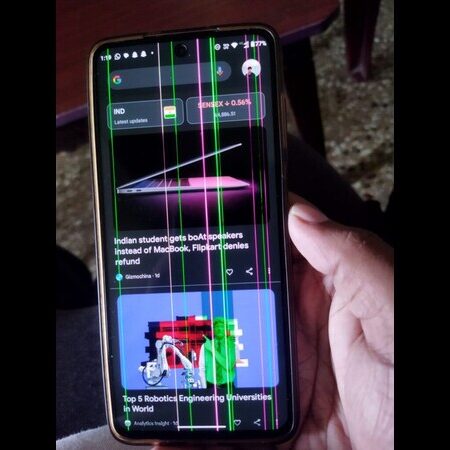
A vertical green line (or sometimes a pink line) on a phone screen is not a software glitch you can restart away.
it is a hardware failure specifically an AMOLED display hardware failure where a row or column of pixels gets stuck in the “on” position due to a fault in the display connector, transistor, or circuit line.
The line is persistent. It shows up on every app, every screen, every wallpaper. It doesn’t disappear when you restart. It doesn’t go away with a factory reset. And no, a software update won’t fix it either.
Think of it like a traffic jam in one specific lane of your display nothing moves, nothing clears, and the lane stays lit up forever.
AMOLED Display Hardware Failure: Why Does This Happen?
AMOLED displays are brilliant technology. True blacks, vivid colors, excellent energy efficiency. But they do have a known vulnerability and India’s climate makes them even more susceptible.
Here are the real, confirmed causes of AMOLED display hardware failure that leads to the green or pink line issue:
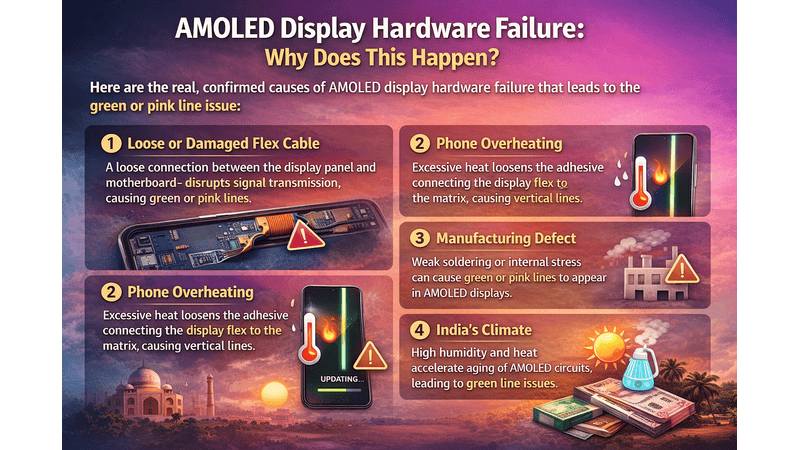
1. Loose or Damaged Flex Cable
The most common cause a loose connection between the display panel and the motherboard specifically the ribbon flex cable disrupts signal transmission, causing visual artifacts like green or pink lines.
2. Phone Overheating
that when a phone gets too hot, the heat spreads to the display or the metal panel behind it. This causes the Anisotropic Conductive Film (ACF) the adhesive that connects the display flex to the matrix to loosen or shrink, disconnecting from the pins. The result? Vertical lines on your phone screen.
Long gaming sessions, fast charging while using heavy apps, and even direct sunlight exposure all contribute to this.
3. Manufacturing Defect
Some AMOLED panels simply leave the factory with weak soldering or internal stress. These units can develop the green line issue without any impact or software trigger it’s a quality control failure, plain and simple.
4. Software Updates (Sort of)
This one needs clarification the update itself doesn’t cause hardware failure, but the heat and power fluctuations *during* an OTA update can trigger an already-weak display connection to finally give up. So if your green line appeared right after a software update, the update was the trigger, not the root cause.
5. India’s Climate
High humidity and heat accelerate the aging of OLED display circuits. This is precisely why that OnePlus’s lifetime display warranty is currently available only in India because a significant number of green line issues have been reported here due to environmental factors.
Dead Pixels vs Bright Lines Are They the Same?
No, and it’s worth understanding the difference.
Dead pixels: are single tiny spots on your screen that stop working they appear black (completely off) or stuck in one color. They’re usually tiny, barely noticeable in normal use, and don’t spread.
Bright vertical: lines (green or pink) are far more dramatic. They run from the top of the screen to the bottom, cover an entire column of pixels, and are impossible to ignore.that a pink line issue on a phone screen is essentially the same hardware failure as a green line just a variation in how the pixel column fails.
If you have a dead pixel, you might live with it. If you have a bright green or pink line? You’ll want it fixed.
Which Phones Are Most Affected?
The green/pink line issue is not brand-specific. It shows up wherever AMOLED displays go. Reported affected models include Samsung Galaxy S20, S21, S22 Ultra, Note 20 Ultra, OnePlus 8, 9, 10 Pro, 11, 12, Nord CE series, Xiaomi, Motorola, OPPO, Vivo, and even some Apple iPhones.
The common thread? They all use AMOLED displays.
What Should You Do First?
Before assuming the worst, try these basic steps:
- Restart your phone. If the line disappears, it was a software glitch — rare, but possible.
- Boot into Safe Mode. This disables third-party apps. If the line goes away, a rogue app may be causing display driver conflicts.
- Check for physical damage. Carefully inspect for any small cracks, pressure marks, or signs of water entry.
If the line stays through all of this especially on the boot screen or during setup it is confirmed AMOLED display hardware failure. There is no software fix. You need a screen replacement.
Samsung Free Screen Replacement Program What’s the Current Status?
Samsung has been running a one-time free display replacement program in India for select Galaxy models affected by the green line issue. It has been extended multiple times since it was first launched. the free screen replacement program has reportedly been extended till July 2026 for eligible devices.
Eligible models include: Samsung Galaxy S20 series, Note 20 series, S21, S21+, S21 Ultra, S21 FE 5G, and S22 Ultra.
Conditions to qualify:
- The phone must have no physical or water damage.
- You must be the original owner with the original purchase invoice.
- The device must have been purchased within three years.
that Samsung replaces the OCTA (On-Cell Touch AMOLED) assembly along with a free battery and kit but customers do need to cover labor charges.
Important note: Samsung service centers have been known to initially deny free replacements citing physical damage or scratches. If that happens to you, stay calm and ask for a written denial slip mentioning the reason. Escalating the issue through Samsung’s official channels or tagging @SamsungIndia on social media has worked for many users.
OnePlus Lifetime Display Warranty — India’s Best Deal Right Now
This is where OnePlus genuinely stands out. that it offers a lifetime warranty against the green line issue on all its smartphone models meaning if your OnePlus phone develops a green line, you get a free screen replacement even if your standard warranty has expired.
that this lifetime warranty currently applies only in India, covers all past and future OnePlus devices, and is part of the company’s “OnePlus Green Line Worry-Free Solution” program launched in late 2024.
Key conditions to know:
- The warranty does not cover user or external damage.
- Your phone must be purchased through authorized channels in India.
- If replacement parts are unavailable for older models, OnePlus may offer an upgrade voucher.
OnePlus has also added a PVX Enhanced Edge Bonding Layer to new AMOLED screens — essentially a moisture barrier that reduces the risk of green lines appearing in the first place. this layer can handle temperatures up to 85°C and humidity up to 85%, which is crucial for Indian weather conditions.
To claim your replacement: visit the nearest OnePlus service center, mention the green line issue, and they will diagnose and replace your display at no cost as long as there’s no physical or external damage.
Mobile Screen Repair Cost in India (Without Warranty)
If your phone isn’t covered under any replacement program, here’s the realistic picture of what AMOLED screen repair costs in India in 2026:
Display Type Approximate Cost
| Display Type | Approximate Cost (India) | Quality / Category |
| Basic LCD | ₹1,500 – ₹3,000 | Budget & Entry-level Phones |
| IPS / Entry-level AMOLED | ₹4,000 – ₹12,000 | Mid-range Smartphones |
| OLED / Super AMOLED / LTPO | ₹10,000 – ₹35,000+ | Flagship & Curved Display Phones |
Brand-Specific Screen Repair Costs
| Smartphone Brand | Repair Range (Estimated) | Popular Series |
| Samsung Galaxy | ₹7,000 – ₹25,000 | S Series & Z Fold/Flip |
| OnePlus | ₹4,000 – ₹13,000 | Number & Nord Series |
| Xiaomi / Redmi / POCO | ₹1,500 – ₹6,000 | Redmi Note & X Series |
| Nothing Phone | ₹6,000 – ₹10,000 | Phone (1), (2), aur (2a) |
| Apple iPhone | ₹15,000 – ₹45,000 | iPhone 13, 14, 15, aur 16 Series |
The final price depends on whether you use original OEM parts or compatible alternatives, and whether you go to an authorized service center or a local repair shop. Authorized centers cost more but use genuine parts. Local shops are cheaper but quality can vary.
A practical rule of thumb: if your screen repair cost exceeds 50% of your phone’s current market value, consider upgrading instead.
Green Line After a Software Update Should You Be Worried?
Many users report the green line appearing immediately after a software update, which has caused widespread panic. The truth is nuanced.
that the green line issue can be triggered by software updates because they generate heat and voltage fluctuations but the actual failure is in the hardware. A software update simply exposes a display that was already stressed.
In other words, if your screen was going to fail, the update just accelerated the timeline. That’s not great news, but it does explain why your neighbor’s phone (same model, same update) didn’t show any issue — theirs was fine; yours had a weaker display connection.
How to Prevent the Green or Pink Line Issue
You can’t guarantee a line will never appear, but you can reduce the risk significantly:
- Avoid using your phone while charging, especially during heavy tasks. The combined heat is a display killer.
- Don’t leave your phone in direct sunlight or inside a hot car.
- Keep your phone updated — Samsung does push display driver patches.
- Use a shock-absorbing case with full-edge protection.
- Avoid pressing hard on your screen or keeping it in tight pockets for long periods.
- Reduce screen brightness and use adaptive brightness settings.
Final Words About Green Line And Pink Line Issue In Smartphones
The green line and pink line issue in smartphones is not a user error. It’s a known AMOLED hardware vulnerability — one that multiple major brands have officially acknowledged by offering free replacement programs.
If you’re a Samsung Galaxy user in India, check your eligibility under the current free screen replacement program and act before deadlines pass. If you’re on OnePlus, you have the most generous protection available — a genuine lifetime display warranty that costs you nothing to claim.
And if you’re outside warranty coverage and facing a hefty repair bill, do the math first. Sometimes a screen replacement makes perfect sense. Other times, that ₹15,000 repair cost on a three-year-old phone is the universe telling you it’s time for an upgrade.
Either way, you now know exactly what that green line means, why it appeared, and what you can do about it. No more guessing.
Frequently Asked Questions of Green Line And Pink Line on Your Phone Screen
Q1. Why did a green or pink line suddenly appear on my phone screen?
Ans. This usually happens due to a hardware defect in AMOLED or OLED display panels. It can be triggered by internal overheating, physical pressure, or a manufacturing fault that affects the display’s connection cable.
Q2. Did the latest software update cause the green line?
Ans. A software update doesn’t “create” the line, but it can cause the phone to overheat during the installation process. This excessive heat can damage the sensitive display hardware, making the line appear right after the update.
Q3. Can I get a free screen replacement if my phone is out of warranty?
Ans. Yes, brands like OnePlus and Samsung have launched special programs for specific models (like the OnePlus 8/9 series or Samsung S21/S22 series). If your phone has no physical cracks or water damage, you might be eligible for a free replacement even after the warranty expires.
Q4. Will a factory reset or restart fix the green line issue?
Ans. No. Since this is a hardware problem, software solutions like restarting, safe mode, or factory resetting the phone will not remove the line. The only permanent fix is replacing the display panel.
Q5. Is the green line issue only found in Samsung and OnePlus phones?
Ans. No, this issue has been reported in almost all brands that use AMOLED screens, including Apple (iPhone), Nothing, Vivo, and Xiaomi. However, it is more commonly discussed in Samsung and OnePlus because of their large user base and specific replacement policies.
Q6. What should I do as soon as I see a line on my screen?
Step 1: Check for any physical damage or scratches.
Step 2: Take a screenshot. If the line doesn’t show in the screenshot, it is a hardware issue.
Step 3: Visit an authorized service center immediately to check for free replacement eligibility.
Q7. Does Nothing Phone offer free screen replacement for green lines?
Ans. Currently, Nothing does not have a “lifetime” warranty policy like OnePlus. However, if your phone is under warranty and has no physical damage, they will replace it for free. For out-of-warranty phones, they usually decide on a case-by-case basis.
Must Read: Google ads kaise band kare